
Auction Reference Guide
This document outlines the usage of the ecoATM Auction website and gives basic instructions along with dos and don’ts that will help you navigate the platform easily. Should you have any challenges, please reach out to us at ecoATM@goldiegroup.com and we will get back to you within 24 hours of the receipt of your question. Additionally, we have an auction hotline that you can call which is staffed by a live person during the last 1 hour of each auction. +1 (978) 363-6920
Basics
- To access the auction website, you need to be registered with The Goldie Group and as a user on the platform. To register as a new user please click on New Customer Registration Form to register your company. If you are an R2 Certified company and wish to participate in R2 only auctions click here to signup. Downstream Vendor Survey Form
- Once registered, our team will onboard you in our system and within 48 hours you will receive your username and password to participate in the auctions.
- When you receive your credentials, please remember to change the password, and set it to something that is convenient for you to remember. Should you have challenges, or you have forgotten the password, please email us and we will have your password reset.
- Once you are registered and you have received your login credentials for the auction platform, use any browser (preferably Chrome or Safari) to open the URL https://vxdvb0x9bzz.c.updraftclone.com and log in using your username and password.
Auctions and Bidding
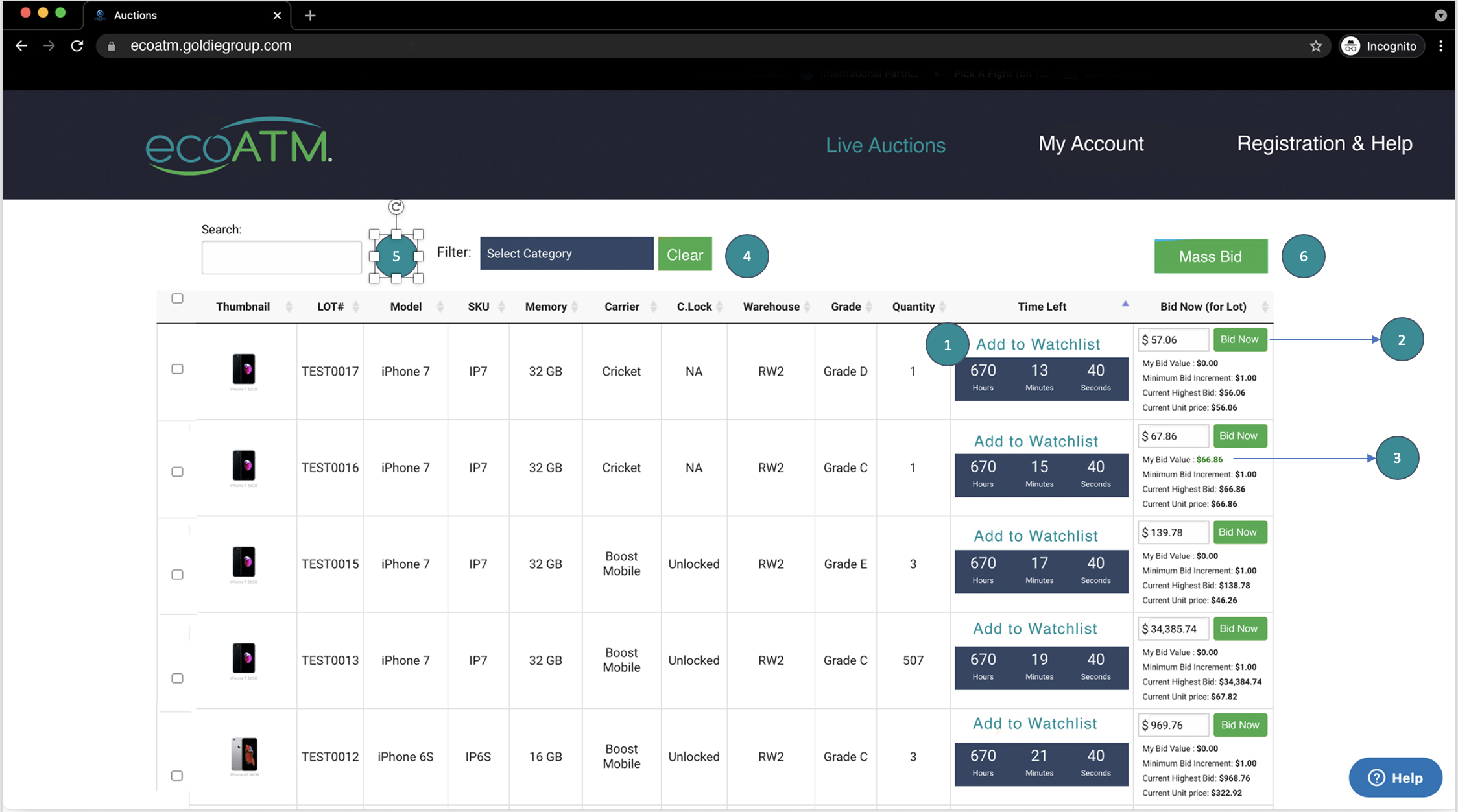
Your auction platform will look similar to the one above. The description for each number is provided below
- Timer – Shows time remaining fore the option to be over
- Bid value – To make it easier for you, this value is repopulated and is the current highest bid value + bid increment. For winning chances, you may wish to increase your bid as many other auctioneers will be bidding in simultaneously. Please ensure that you are placing the bid on the correct auction
- This is the last bid that you have placed on the auction displayed in that row.
- If you haven’t placed any bid yet, the value will be zero
- If your bid is the highest then the color of the bid will turn green to indicate that you are winning
- If the bid value is black in color then you are not the current highest bidder on the platform, for that particular auction
- Filter – Use the Category filter to filter the auctions basis Grade, Manufacturer, Warehouse etc. You can use the clear button to remove any filters that may have been applied on the auction table
- Search Button – You can search for lot number, manufacturer (like iPhone, Samsung, etc), warehouse, etc instead of using the filter
- Mass Bid – Select one or more row items using the check box and click on the Mass Bid button to place bids on multiple auctions at the same time
- After selecting the necessary auctions, click on Mass Bid button. At least one row will have to be selected for Mass Bid button to work
- A pop-up opens up with the selected auctions. The chosen auctions are already checked.
- Input your bid values or you may choose to retain the suggested values. Click on Bid Now right on top to place your bids.
- The values will be submitted, the pop-up will close and the page will be refreshed to show the newly updated bid
 At any point in time, if you face any trouble or challenge using the platform, hit the small blue help button and place your query. Someone from our support will respond to you as soon as possible.
Additional Information
- You will be presented with a table of live auctions along with the countdown timer for auction end times.
- You may click on the columns to sort the auctions as preferred. Please be aware that upon refreshing the page, the sort order will revert.
- You can bid on individual lots by entering a bid value which is greater than, or equal to, the suggested bid value. Once you have entered the bid value, click on the Bid Now (orange colored) button to submit your bid. The system asks you to confirm your bid submission, so please confirm and submit your bid. The page will refresh and update the values if successful. Please note that you will be able to bid for the entire quantity only.
- You may bid on individual line items as many times as necessary to win the auction for those line items.
- You may also use the chat functionality available on the website to raise queries and someone will respond to you as soon as possible.
- Mail confirmations will keep you posted on your winning or outbid status. Keep a watch on the
Your Account
- Once you have placed bids you will receive emails on your bid submissions. Please make sure you have checked spam and have marked noreply@goldiegroup.com as a safe and approved email address for you to receive further updates.
- On the “My Account” tab, navigate to the “Auctions” page on the left side.
- From here, you can view Bids Active (auctions that have not ended), Bids Won and Bids Lost (Auctions that have already ended), and your Watchlist items.
When the auction is over
- When the auction is over, the winners of each lot will be notified via email.
- Bids will be submitted to ecoATM for approval. If the winning bids are approved by ecoATM, the buyer will be notified to make payments appropriately to reserve your purchases.
- Once notified, you are requested to make the payments within 24 hours to secure your bid. Items that are not paid within 24 hrs may be awarded to the next highest bidder & may result in suspension and/or removal from the auction.
- Upon receipt of payment, you will be emailed confirmation that the batch is ready for pick-up, along with weights & dimensions.